
Arena Breakout Infinite ESP Guide: Player ESP, AI ESP, Skeleton, Health and Visual Indicators
Arena Breakout ESP on PC: player ESP, AI ESP, box, skeleton, health, snaplines, inventory, and how wall-hack talk maps to overlay draws.
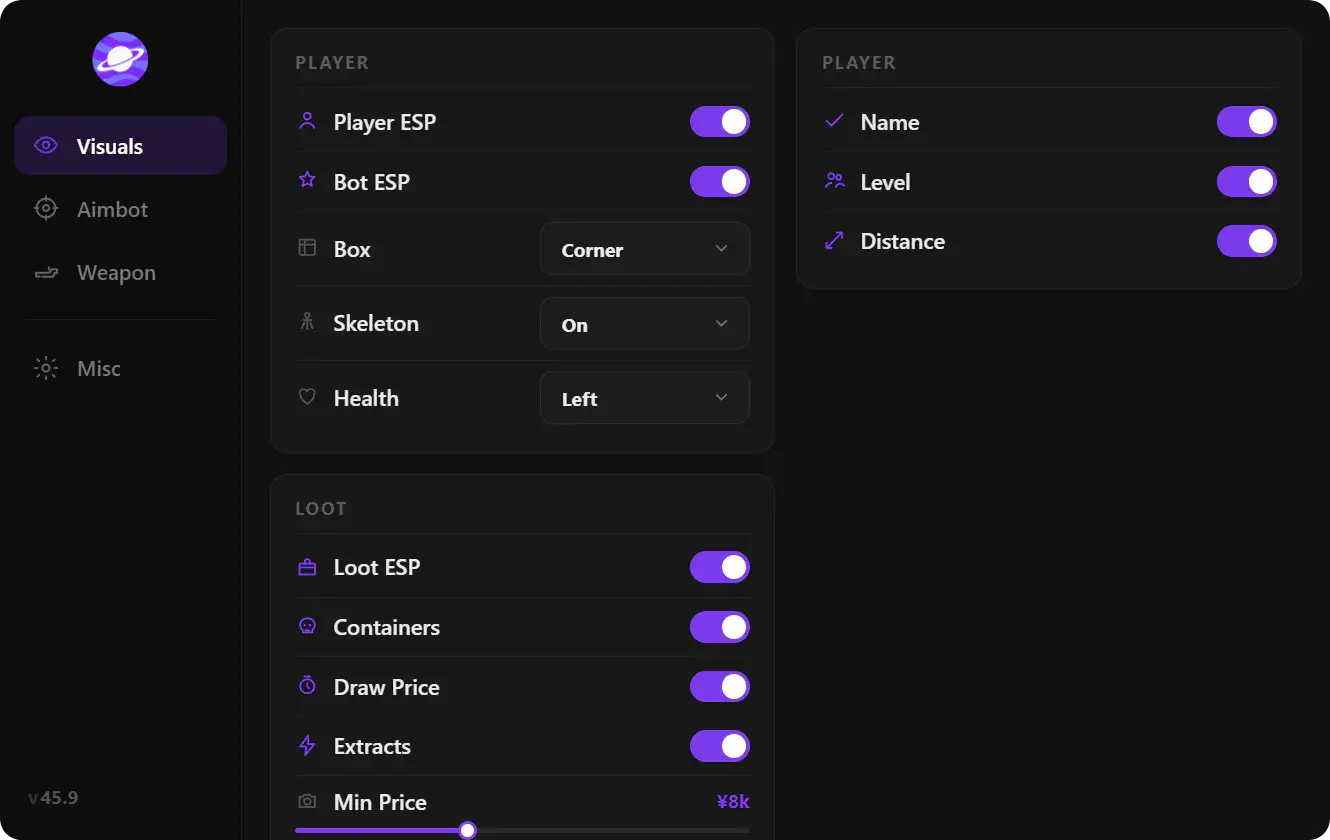
This Arena Breakout ESP guide covers player ESP, AI ESP, and every visual indicator in the current overlay: box, skeleton, health, snaplines, inventory, and more. ESP draws information. It does not move the mouse. That is aimbot.
People search Arena Breakout Infinite wall hack when they mean this overlay. It is a draw path on player and AI data, not a walk-through-geo mode.
Player ESP vs AI ESP
Player ESP tags operators. AI ESP tags scavs and other bots. Infinite still mixes both in many raids. Color or a label split stops you from swinging a full mag into a dummy.
Use a master Enable toggle so you can kill the whole vision stack in one click if a patch makes draws noisy. Then re-enable player first, AI second.
Visual elements
| Option | Purpose |
|---|---|
| Enable | Master vision toggle |
| Box | 2D/3D rectangle on the body |
| Skeleton | Bone pose: crouch, lean, vault |
| Health Bar | HP so you know if a peek is a crack |
| Head Circle | Head mark for angle checks |
| Snaplines | Line from screen edge or crosshair to target |
| Distance | Meters to the player or bot |
| Name | Operator name plate |
| Team Index | Squad index in team raids |
| Weapon Type | What they are holding |
| View Direction | Where they are looking |
| Inventory List | Worn and bag items |
| Inventory Price | Koen value of that kit |
| Level | Displayed level |
| Side / Faction | Side label when the raid uses one |
Box ESP
Box is the default read. One thickness, team color, max distance. Thick neon boxes in a four-man fight hide the model you need to shoot.
Skeleton ESP
Skeleton shows pose. Use it close. On long Valley lanes a box plus distance is enough and cheaper on the HUD.
Health bar and head circle
Health tells you whether to commit. Head circle is an aim reference, not a second aimbot. Keep it small.
Snaplines and distance
Snaplines find people off-center in a dark Armory hall. Distance stops you from chasing a 180m third party. Cap draw range to the fight you can take.
Name, team index, weapon, view direction
Name and team index matter in squads. Weapon type tells you if they brought a bolt gun to your hallway. View direction is a pre-aim for corners.
Inventory list, price, level, side
Inventory list and price are kit reads on living players. Corpses use a different filter set: corpse ESP. Level and side are extra text. Drop them if the HUD is loud.
How to keep ESP readable
Font size sits in the interface guide. Client grass and shadows sit in best ABI settings. ACE does not care which box color you picked; the draw path still has to match the current session: anti-cheat.
Save a “close compound” profile and a “open map” profile in the config guide.
If you want this vision stack in the same portal as aimbot and loot filters, Arena Breakout cheats is the catalog page.
FAQ
Is ESP a wall hack?
In search language, yes. In the overlay, it is drawn info on players and AI. You still collide with walls. You still need a gun that pens the armor.
Can I run ESP without aimbot?
Yes. Vision-only is a common first config. Add a hold-to-aim key later if you want assistance in the same FOV you already track.
Why split player and AI?
Bots eat attention. A different color or a toggle saves mag and time. Forbidden still has AI in many spawns.
Should inventory stay on in a gunfight?
Often no. Keep box + health + weapon in combat mode. Open inventory list when you are deciding to third-party a kit.
Does corpse ESP belong here?
No. Living players and dead kits are different filters. Use the corpse article for min price and body distance.